Montezuma Puzzle1.1.9
Publisher Description

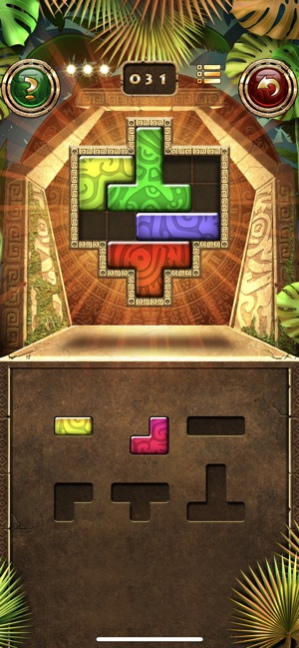
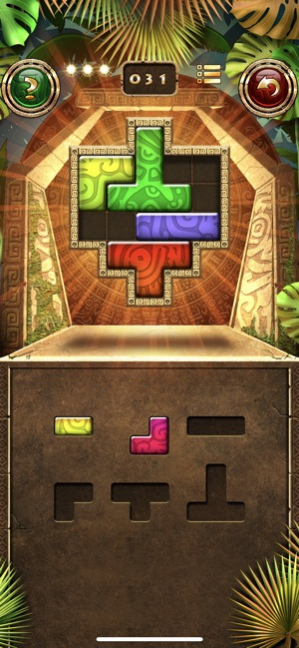

Montezuma Puzzle is a relaxing and logical tiling puzzle game in the Ancient Aztec Empire scenery. Arrange the puzzle shapes in the right patterns. Sounds simple? Try out!
Features:
-400 unique patterns to arrange
-easy and intuitive
-one touch control system
-delightful graphics and chill music
-unlimited hints
*********Try also Montezuma Puzzle 2**********
Version History -some bugs fixed. 1.1.9 06/18/2020 -some bugs fixed 1.1.8 11/29/2018 -some bugs fixed 1.1.7 09/08/2018 - some bugs fixed 1.1.6 06/22/2018 - some bugs fixed 1.1.5 06/02/2018 - hints problem solved 1.1.4 05/27/2018 - in-app purchase added
- some bugs fixed 1.1.3 05/27/2018 - some bugs fixed 1.0.9 10/19/2017 Level 100 problem fixed. 1.0.8 04/13/2017 Some bug fixed. 1.0.7 04/06/2017 some small bug fixing 1.0.6 07/10/2013 -some bug fixing 1.0.5 04/18/2013 -ADDITIONAL 100 LEVELS !!! 1.0.4 02/20/2013 -100 FREE LEVELS
-New Additional Machu Picchu scenery 1.0.3 01/12/2013 -new free levels
-display connected bug fixed 1.0.2 12/14/2012 Bug with displaying on iPhone 3GS fixed 1.0.1 12/04/2012 1.0.0 09/25/2012
About Montezuma Puzzle
The company that develops Montezuma Puzzle is ECO Pawel Jarosz. The latest version released by its developer is 1.1.9.
To install Montezuma Puzzle on your iOS device, just click the green Continue To App button above to start the installation process. The app is listed on our website since 2026-10-16 and was downloaded 9 times. We have already checked if the download link is safe, however for your own protection we recommend that you scan the downloaded app with your antivirus. Your antivirus may detect the Montezuma Puzzle as malware if the download link is broken.
How to install Montezuma Puzzle on your iOS device:
- Click on the Continue To App button on our website. This will redirect you to the App Store.
- Once the Montezuma Puzzle is shown in the iTunes listing of your iOS device, you can start its download and installation. Tap on the GET button to the right of the app to start downloading it.
- If you are not logged-in the iOS appstore app, you'll be prompted for your your Apple ID and/or password.
- After Montezuma Puzzle is downloaded, you'll see an INSTALL button to the right. Tap on it to start the actual installation of the iOS app.
- Once installation is finished you can tap on the OPEN button to start it. Its icon will also be added to your device home screen.
Program Details
System requirements
Download information
Pricing
Version History
version 1.1.9
posted on 2026-10-16
Version History -some bugs fixed. 1.1.9 06/18/2020 -some bugs fixed 1.1.8 11/29/2018 -some bugs fixed 1.1.7 09/08/2018 - some bugs fixed 1.1.6 06/22/2018 - some bugs fixed 1.1.5 06/02/2018 - hints problem solved 1.1.4 05/27/2018 - in-app purchase added
- some bugs fixed 1.1.3 05/27/2018 - some bugs fixed 1.0.9 10/19/2017 Level 100 problem fixed. 1.0.8 04/13/2017 Some bug fixed. 1.0.7 04/06/2017 some small bug fixing 1.0.6 07/10/2013 -some bug fixing 1.0.5 04/18/2013 -ADDITIONAL 100 LEVELS !!! 1.0.4 02/20/2013 -100 FREE LEVELS
-New Additional Machu Picchu scenery 1.0.3 01/12/2013 -new free levels
-display connected bug fixed 1.0.2 12/14/2012 Bug with displaying on iPhone 3GS fixed 1.0.1 12/04/2012 1.0.0 09/25/2012
version 1.1.9
posted on 2020-06-18
-some bugs fixed.
version 1.1.9
posted on 2020-06-18
Jun 18, 2020 Version 1.1.9
-some bugs fixed.
version 1.1.9
posted on 2020-06-18
18 Jun 2020 Version 1.1.9
-some bugs fixed.
version 1.1.8
posted on 2018-11-29
Nov 29, 2018 Version 1.1.8
-some bugs fixed
version 1.0.6
posted on 2012-09-28
version 1.1.9
posted on 1970-01-01
2020年6月18日 Version 1.1.9
-some bugs fixed.
